How To Find Drivers
The Process
- Go to your device manager. You can find it at Control Panel>System>Hardware>Device Manager.
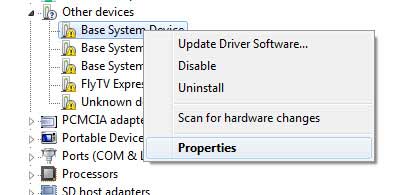
- If you have any device with its driver missing, you will be able to see the device labeled as Unknown Device
with a yellow exclamatory sign. - Right click the unknown device you will find details after you click properties.
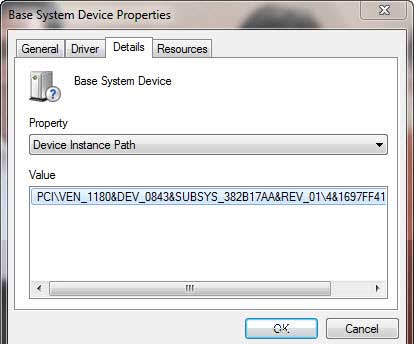
- Now, navigate to the Details tab and select the Device Instance Path form the drop down list.
- You will be able to see the Instance path similar to:
PCI\VEN_1180&DEV_0843&SUBSYS_382D17AA&REV_05\4&1697FF41&0&22F0 - Now, copy the Vendor ID and Device Id of the device in a notepad. The one in REDis Vendor ID and the one in GREEN
is device ID.
or the other is always missing. Once we want to clean device drivers for our system.
If we miss some of the drivers, nothing works fine. Here are some ways to find unknown device drivers in Windows.


No comments:
Post a Comment